
Launch Your Own Minecraft Network with ServerPrism Proxy Hosting
ServerPrism makes Minecraft proxy networks simple. Launch Velocity or BungeeCord in minutes, add backends from 11 game-mode presets, and skip the forwarding-config headache.

Some of the biggest Minecraft communities in the world (Hypixel, Mineplex, Wynncraft) don't actually run on a single server. They run on a network: a proxy in front of multiple game-mode servers, all stitched together so players see one IP, one lobby, and one community.
For a long time, building that kind of setup yourself meant juggling multiple hosting plans, copying forwarding secrets between config files by hand, and praying nothing broke when you restarted. We wanted to make it simpler.
That's why we built ServerPrism Minecraft Proxy Hosting, our dedicated platform for launching Velocity and BungeeCord networks in minutes, not hours. ServerPrism is a CloudNord product, built on the same hardware and support team you already trust, but purpose-designed for running multi-server Minecraft networks.
You can check it out here: serverprism.com/minecraft-proxy-hosting.
What Is a Minecraft Proxy Network?
A proxy network is a group of connected Minecraft servers sitting behind a single front-door server called a proxy. Players connect to one IP, and the proxy routes them between different game-mode servers like Lobby, SkyBlock, Bedwars, Survival, and so on. Behind the scenes, each game mode runs as its own independent server with its own world, plugins, and resources.
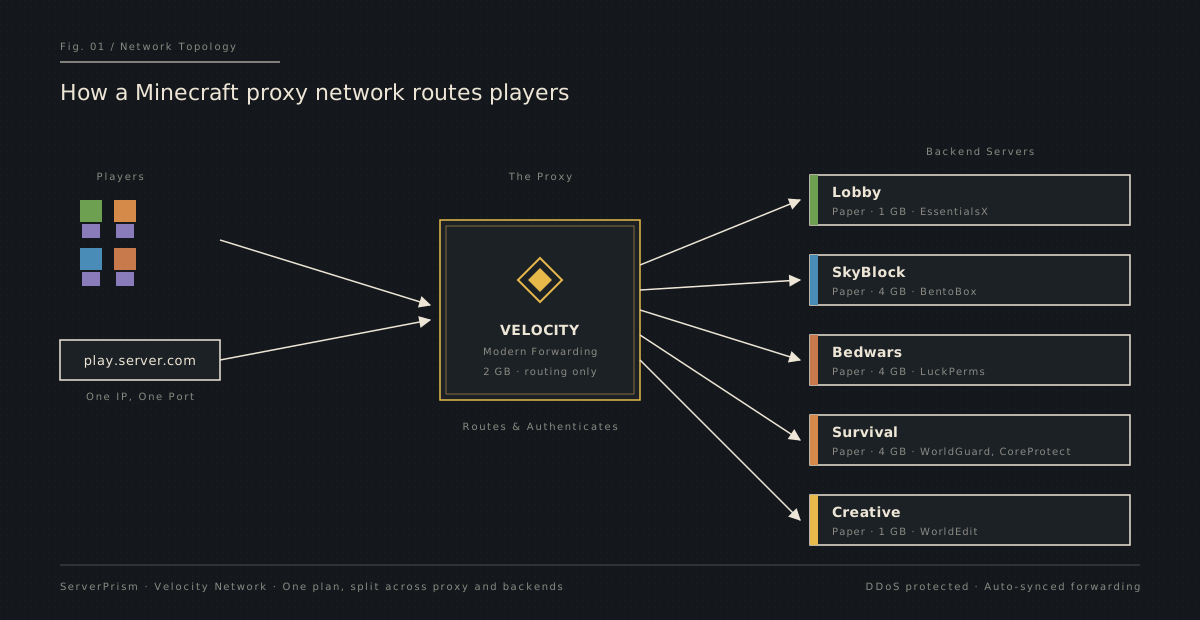

This architecture is how every large Minecraft community scales. Instead of cramming every game mode into one overloaded server, each mode gets dedicated resources, and the proxy handles routing players between them with /server commands or compass GUIs.
The two most popular proxy options are:
- Velocity: the modern, actively maintained proxy. Faster, more secure thanks to modern forwarding, and our recommended choice for any new network.
- BungeeCord (and Waterfall): the legacy option. Still widely used, still supported on ServerPrism, but mostly relevant if you have an older setup you're migrating.
Both are supported. If you're starting fresh, go with Velocity.
One-Click Network Setup
The hardest part of running a network has always been the wiring. With ServerPrism, you choose a plan, pick Velocity or BungeeCord as your runtime, and your proxy is live in under a minute. From there, you split off backend servers from a list of game-mode presets:
- Lobby: EssentialsX pre-installed
- Survival: WorldGuard and CoreProtect ready to go
- SkyBlock: BentoBox configured out of the box
- Bedwars: LuckPerms and rank-ready
- Creative: WorldEdit pre-installed
- Factions, KitPvP, Prison, Minigames, Practice: all with sensible defaults
- Custom: a blank Paper server you can shape however you like
Each backend gets its own dedicated slice of RAM, CPU, and disk from your plan. Add or remove backends anytime, with no downtime on the rest of the network.
Zero-Config Forwarding
If you've ever set up a Velocity network manually, you know the pain: copying the forwarding secret into every backend's paper-global.yml, setting online-mode=false in server.properties, updating velocity.toml with each new backend's IP, and restarting everything in the right order without locking yourself out.
ServerPrism handles all of that for you. Hit the Sync button on the Network Dashboard and we automatically:
- Generate and push the forwarding secret to every Paper backend
- Update
velocity.tomlwith the correct backend IPs - Set
online-mode=falseon each backend'sserver.properties - Configure modern Velocity forwarding everywhere
One click. Restart. Done.
The Network Dashboard
Running a network used to mean bouncing between multiple control panels, with one tab per backend. The ServerPrism Network Dashboard puts everything in one place.
From the proxy page you get:
- Live resource bars: RAM and CPU usage per backend, refreshed every 10 seconds
- Remote power controls: start, stop, or restart any backend without leaving the page
- Connection status at a glance: instantly see which backends are connected to the proxy
- Start All / Stop All: bring the entire network online with a single button
It's the difference between managing infrastructure and running a community. The dashboard handles the infrastructure so you can focus on the community.
Resource Splitting
One of the things we wanted to get right was flexibility. With ServerPrism, you don't buy one plan per server. You buy one plan and split it however you want.
A 16 GB Community Network plan, for example, can become:
- A 2 GB Velocity proxy
- A 4 GB SkyBlock backend
- A 4 GB Bedwars backend
- A 4 GB Survival backend
- 2 GB held in reserve
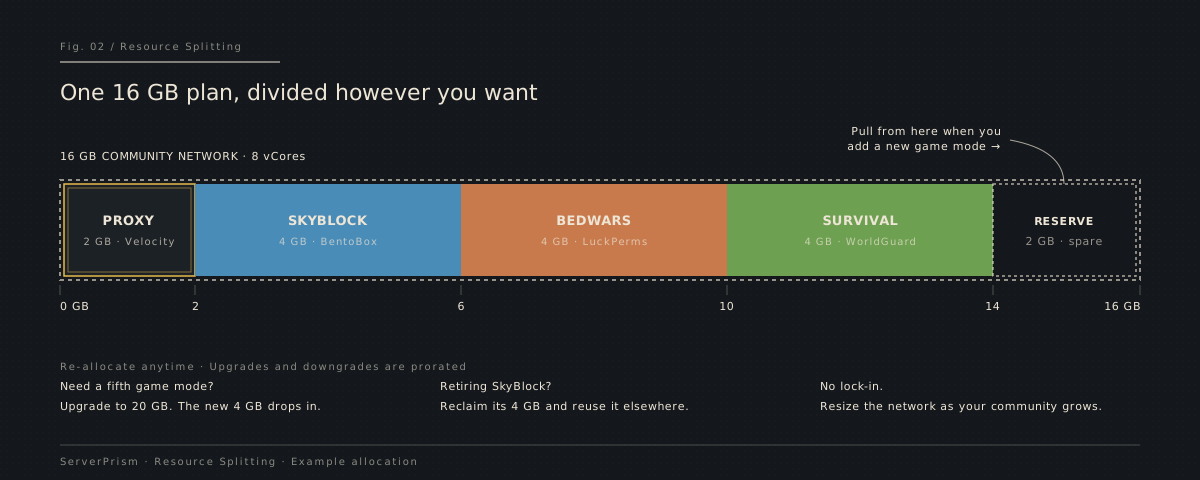

Want to add a Creative backend later? Pull resources from somewhere else, or upgrade the plan and split the new RAM in. Need to retire a game mode? Reclaim its resources for something else. Everything is fluid, and upgrades and downgrades are prorated automatically.
Enterprise-Grade Hardware
ServerPrism networks run on the same hardware tier we use across CloudNord:
- AMD Ryzen 9-series CPUs, with top-tier single-thread performance, which is exactly what Minecraft cares about
- DDR5 ECC memory at 5600 MHz, error-correcting RAM for stability under sustained load
- NVMe Gen4 SSDs (PCIe 4.0 x4) for fast world loading, even with heavy modpacks or large worlds
- 10 Gbps redundant uplinks with DDoS protection, so players connect to the proxy and your backends stay hidden behind it
Network locations are available in Europe, North America, Asia, and Australia, so you can deploy close to wherever your community lives.
Pricing
ServerPrism proxy plans currently start at $3.66/month for the 2 GB Starter Network (with the active 20% discount applied), and scale up through Community Networks (10 to 16 GB) and Large Networks (20 to 32 GB), all the way to Enterprise tiers up to 128 GB for serious public networks.
Every plan includes:
- Unmetered disk space (soft cap, increased on request)
- Velocity, BungeeCord, and Waterfall support
- All 11 game-mode presets
- DDoS protection
- 24/7 monitoring and expert support
- Modrinth plugin browser with 10,000+ plugins
We also run a Best Price Guarantee. If you find the same specs cheaper elsewhere, send us the link and we'll match it.
Three Steps to a Live Network
- Choose your proxy: Velocity (recommended) or BungeeCord.
- Add game modes: pick from the 11 presets, or build a custom Paper backend.
- Sync and play: one click syncs every config, then connect and you're live.
That's the entire workflow. From order to players connecting is usually under five minutes.
Ready to Build Your Network?
Whether you're starting your first SMP-plus-minigames hub for friends, or scaling a community that's outgrown a single server, ServerPrism gives you the tools to do it without fighting your hosting provider every step of the way.
Head over to serverprism.com/minecraft-proxy-hosting to pick your plan and spin up your first proxy. The 20% discount is live, so it's a great moment to launch.
See you online.